
I was listening to Cal Newport’s Deep Work podcast1 this morning and he walked through five ways to reclaim your smartphone and use it, once again, like it was originally introduced back in 2007. At the yearly Mac World event in January of 2007, Steve Jobs introduced the first iPhone that would do “three things: a widescreen iPod with touch controls, a revolutionary mobile phone and a breakthrough Internet communications device.”2 It was an extraordinary moment but in that moment Jobs was not anticipating what Newport dubs the “attention platforms economy.” What was initially a tool with which we could create and do work quickly became a device which companies spent billions getting users to spend as much time as humanly possible on their screens with no thought or care for what that might do to them. We are the product of their greed dreams and we have given ourselves willingly to them.
Newport, for his part, has been pushing back for years. His book “Digital Minimalism” is a helpful guide to intelligent reflection on a relationship with our phones that can lead to a more sane and healthy use of them.3 In this particular episode, he offers five ideas for taking smartphone habits back to the healthier days of 2007 when they were still simply tools to be used by us rather than devices consuming us. All of his ideas are helpful and I’d encourage you to listen to the episode if reclaiming your phone as a tool rather than a time sucking device is something you’re wanting to explore.
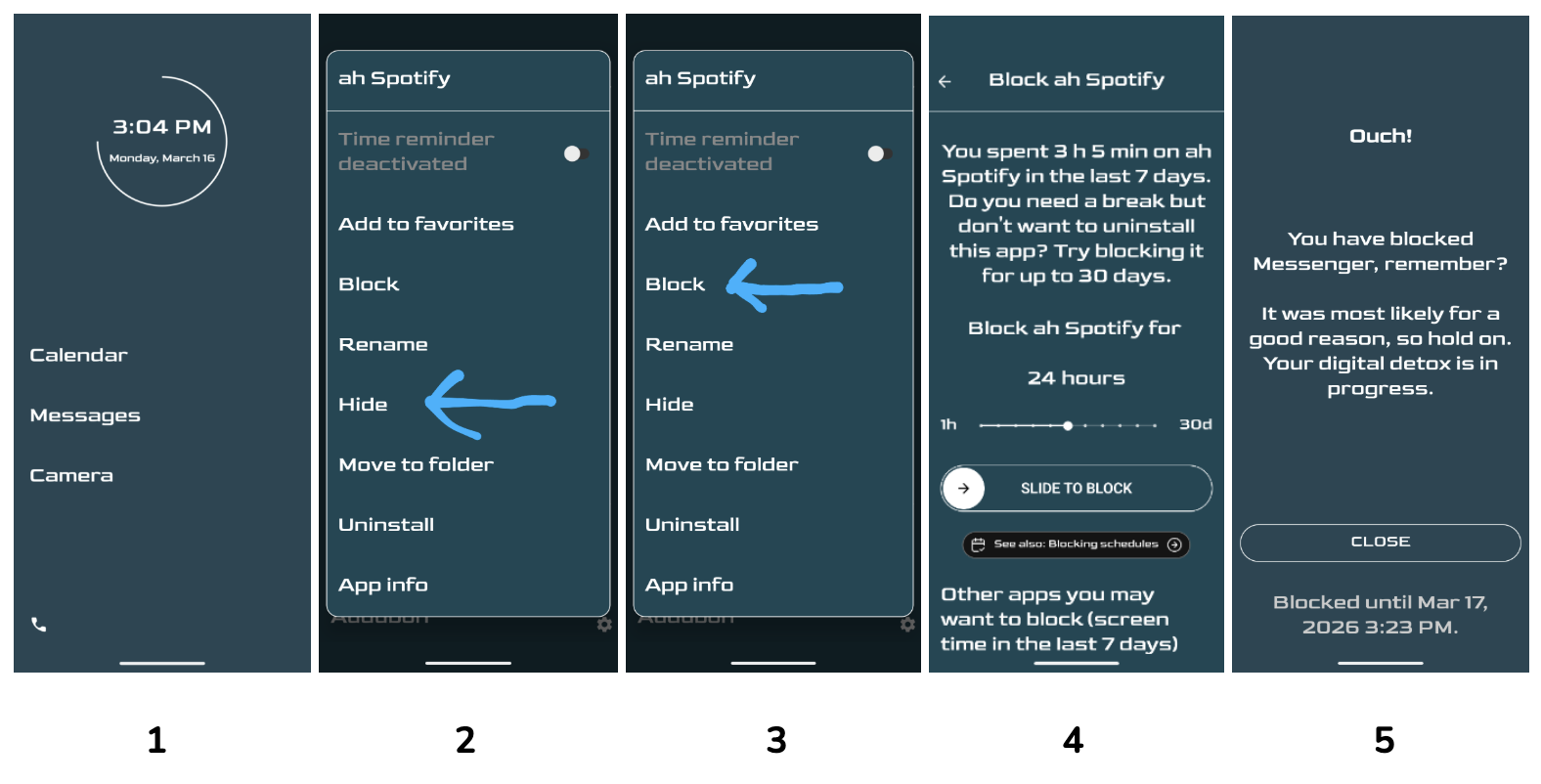
The first idea shared is to transform the look of the phones digital interface so that it looks less like a slot machine and more like a monochromatic list of apps. He shares about several apps that can do this but the one I’ve been using for the past few years, Minimalist Phone, did not make his list and because I think it has been spectacular, I’d like to tell you about it.4 Like most minimalist phone apps, it transforms your phone into a rather boring list of apps by name only. You’ll have a home screen which can include up to six of your most used apps (#1 above) and a secondary screen with a list of everything else in alphabetical order. That alone has been helpful but there are a few other features I’ve utilized that have made it worth the $30.00 yearly fee.
First is the ability to hide apps (#2 above). They remain on your phone but are in a hidden folder which requires a few extra steps to access. This may be enough—out of sight, out of mind—for most of us. A second feature that I’ve found helpful is the ability to actually block an app (#3 above) for a range of time from 24 hours to 30 days (#4 above). Once an app is blocked, if you try to access it you’ll get a friendly reminder about why you can’t access it with the date it will be available again (#5 above). The only way to unblock an app is to wait for the time to pass or uninstall the Minimalist App.
The Apostle Paul reminds us to “pay careful attention, then, to how you walk—not as unwise people but as wise— making the most of the time, because the days are evil” (Eph. 5:15-16, CSB). The Minimalist app has been a helpful tool allowing me to do a better job of making the most of my time as I live with my smartphone. I hope it will help you as well.
Resources Mentioned
 Cobbled Together